
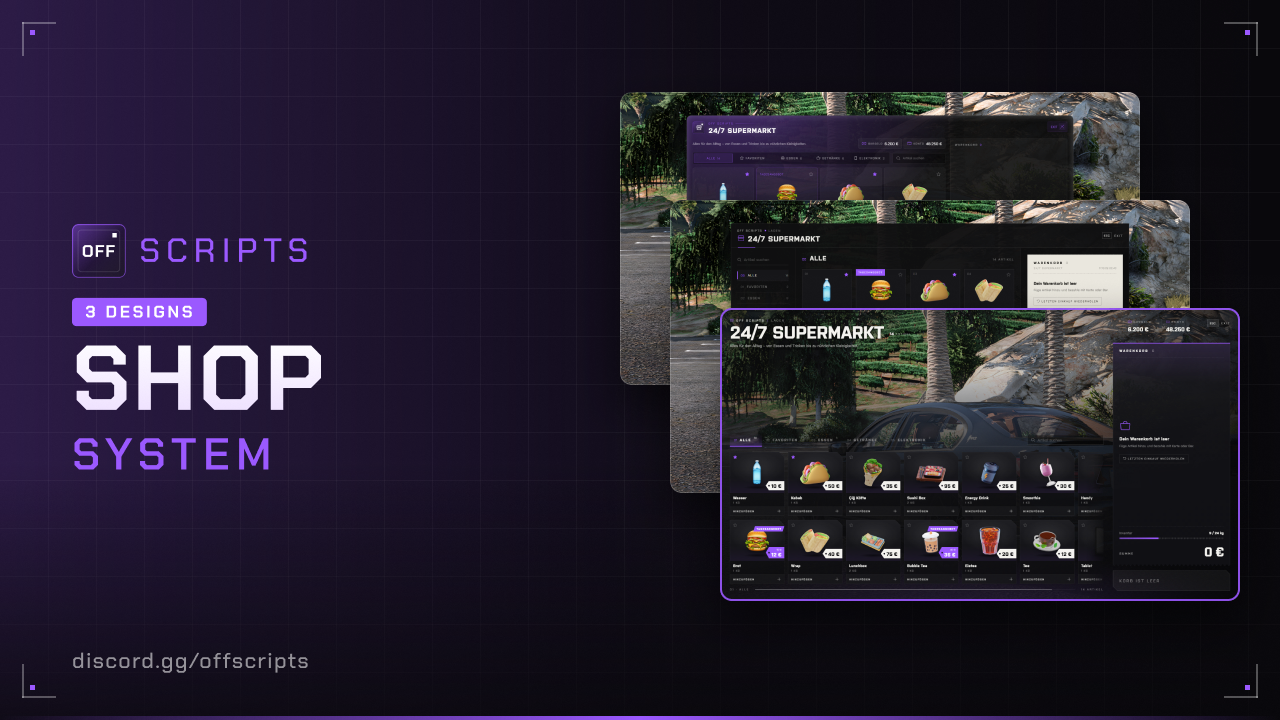
Shops
Shop system for the default inventory and ox_inventory: stores with a cart, gun stores, a rotating black market, daily deals, NPC clerks and an in-game shop editor.
- ESX Legacy (
es_extended) - oxmysql
- Inventory: ESX default inventory or ox_inventory (detected on start)
- Optional: ox_target
Features
- Three shop types: store with a cart, gun store and black market. You pay by card or cash, on the black market with black money.
- The server checks prices, total, weight and distance. Stock only for bought stores. Rules per shop type, store or item.
- Buyable stores: players buy a store, set prices, fetch goods from the wholesaler on delivery runs and manage the register.
- Rotating black market with changing locations, item selection and prices, plus daily deals in normal stores.
- In-game shop editor with NPC model, scenario, marker with live preview and custom blip.
- Discord logs per purchase and live statistics in Discord.
Installation
- Put the
off_shopsfolder into yourresourcesfolder. - All items from
config/settings/config.items.luamust exist in your inventory – ESX:itemstable, ox_inventory:ox_inventory/data/items.lua. Weapons (weapon_…) don't need an entry with ESX. - Add to your
server.cfg– after ESX, oxmysql and your inventory:
ensure oxmysql
ensure es_extended
ensure ox_inventory
ensure off_shops
The tables are created automatically and extended on updates.
Configuration
config/settings/config.lua
| Option | Default | Description |
|---|---|---|
serverInfo.name | 'OFF SCRIPTS' | Server name, shown in the UI instead of "OFF SCRIPTS" |
serverInfo.locale | 'de' | Language: de, en, pl, fr, es, it or nl |
serverInfo.color | { 155, 89, 255 } | UI color (RGB) |
serverInfo.design | 3 | UI design: 1 = Classic, 2 = Receipt, 3 = Storefront |
blur | true | Blurred background while the shop is open. The editor stays sharp (preview) |
useTarget | false | true = ox_target instead of E |
pedSpeech | true | NPC greets, says goodbye and thanks you with voice |
purchase.maxPerItem | 25 | Max amount per item and purchase |
deals.enabled / count / discountPercent | false / 2 / 20 | Daily deals (normal stores only, no weapons): on/off, number, discount in percent |
marker.color / marker.alpha | { 155, 89, 255 } / 150 | Default color and opacity of the markers |
editor.command / editor.groups | 'shopeditor' / { 'projektleitung' } | Command and ESX groups for the editor |
stats.enabled / updateMinutes | true / 10 | Live statistics in Discord, update interval in minutes |
blackmarket.rotation / activeLocations | 'day' / 1 | Black market rotation ('day', 'week', 'month') and how many are there at the same time |
blackmarket.itemsPerCategory / priceVariancePercent | 2 / 15 | Items per category in the period, price variance in percent |
shopTypes | normal, weapon, blackmarket | Per type label, ped (clerk), uiColor (own UI color), blip and rules |
Rules (rules) exist per shop type, store or item: jobs, blockedJobs, minGrade and hours = { from, to } (in-game time, 22–5 = 22:00–04:59).
config/settings/config.locations.lua – Locations
{ type = 'normal', label = 'LTD Davis', interactionType = 'ped', position = vec4(-47.02, -1758.23, 29.42, 45.05), categories = { 'food', 'drinks', 'tools' } },
{ type = 'blackmarket', interactionType = 'ped', position = vec4(14.2280, -1104.0475, 29.7970, 340.0), categories = { 'weapons', 'illegal' } },| Field | Description |
|---|---|
type | 'normal', 'weapon' or 'blackmarket' |
interactionType | 'ped' (NPC, vec4 with heading) or 'marker' |
categories | Which categories the store sells |
price | Optional: purchase price · without price the store is not for sale |
label / rules / blip = false | Optional: custom name, custom rules or no map icon |
Locations with type = 'blackmarket' are possible black market spots – activeLocations of them are active at the same time.
Categories and items
food = { label = 'Essen', items = { 'bread', 'kebab', 'wrap' } }, -- category
{ name = 'water', label = 'Wasser', price = 10 }, -- item- Optional per item:
max(custom max amount),image(custom image),rules(custom rules). weapon_…is treated as a weapon: bought one at a time, with 42 rounds in the ESX inventory, not twice.- Images: ESX loads
web/dist/assets/items/<name>.png, ox_inventory uses its own. Put missing weapon images atweb/dist/assets/weapons/<name>.png.
config/functions.lua
| Function | Purpose |
|---|---|
Notify(message, type) | Custom notify · Server: Notify(source, message, type) |
HelpNotify(text) | Help text at the clerk or marker |
Discord logs
You enter the webhooks in config/settings/config.server.lua (server-side only): purchases logs every purchase, stats is the live statistics. An empty url ('') turns the log off.
Languages
All texts are in config/locales/<language>.json. For your own language, copy a file, translate it and set locale – leave placeholders like %s and {total} in place.
In game
Press E at the clerk or marker (or use ox_target), choose items and pay. In the store there is a cart, in the gun store and on the black market you choose one item.
Shop editor (/shopeditor)
- On the left are all stores from the editor. Stores from the config aren't listed there, you change them in
config/settings/config.locations.lua. - New creates a store at your current position, Edit opens an existing one.
- You can set type, name, categories, NPC or marker, position with heading and blip.
- NPC: Choose a model from an image list of all GTA peds (search and categories), plus scenario and heading, all with live preview in game. You pick an addon ped by its exact model name in the search. Default = clerk from
shopTypes. - Marker: Type, size, ground offset, rotation, color, opacity and motion with live preview in game.
- Blip: on or off, optionally with a custom icon and custom color. Otherwise the blip from
shopTypesapplies. - While the editor is open, you walk with WASD and look around by holding the right mouse button. Then press Take position.
- After Save, the change applies to all players immediately. A black market from the editor stays in one place and sells all items of its categories.
Buyable stores
Whether a store can be bought is set with price in config.locations.lua for config stores, and in the shop editor for editor stores (group Ownership: For sale, Purchase price). The black market is never for sale. Stores without an owner keep selling as usual without stock.
Option (ownership) | Default | Description |
|---|---|---|
enabled | true | Buyable stores on/off. Off = everything as without the feature |
maxPerPlayer | 1 | How many stores one player may own |
startStock / maxStock | 20 / 200 | Starting stock per item after buying / maximum stock per item |
priceRange.min / max | 0.8 / 1.5 | Allowed selling price = base price × min to max |
wholesaleFactor | 0.6 | Wholesale price = base price × factor |
sellBackPercent | 60 | Server buyback in % of the purchase price |
van / orderMaxUnits / orderMinutes | 'speedo' / 300 / 20 | Delivery van, max units per run, time limit in minutes |
vanSpawn | vec4(...) | Spawn point of the van, the player is teleported there |
refundPercent | 0 | Refund in % for a failed or cancelled delivery |
wholesalers | 3 × vec3 | Wholesalers, the one nearest to the store is used |
In game: At a store that is for sale, E first opens a choice between Shopping and Management, with a camera on the clerk if the store has an NPC. If someone else owns the store, the shop opens directly. Without an owner Management leads to the offer, as owner to the management with Overview (register, revenue today/7 days/total, chart, almost sold-out items), Stock, Prices, Order and Register (withdraw/deposit cash or bank, history, sell store). Customers pay into the register and can only buy what is in stock.
Delivery run: Pick goods, the cost is paid from the register. You are teleported to the spawn point vanSpawn and put into the van – drive to the wholesaler, press E in the marker (load), drive back and park the van in the marker, then walk to the clerk and press E. Only then are the goods stocked. If the van is destroyed, time runs out or you leave the server, the goods are lost (refund per refundPercent). After a server restart an open run is fully refunded.
Discord log: webhook ownership in config/settings/config.server.lua (buy, sell, deliveries, withdrawals/deposits). Release in the editor frees a store again (stock and register are lost).
Common issues
| Problem | Solution |
|---|---|
[ERROR] in the server console | The script checks the setup on start. Read the message, fix it, restart the script. |
| “This item is invalid” | The item is missing in the inventory (ESX: items table, ox_inventory: items.lua). |
| ox_inventory isn't detected | ensure ox_inventory must be before off_shops. |
| Black market is closed | By default only 22–5 in-game time (rules.hours). |
| Black market isn't there | Only activeLocations locations are active – the others at the next rotation. |
| Black market: “Not enough money” | The black market only takes black money (black_money). |
/shopeditor doesn't open | Your ESX group must be in editor.groups. |
| “The NPC model … does not exist” | Check the model name, e.g. mp_m_shopkeep_01. Addon peds must be streamed. |
Not bought yet?
View Shops in the shop