
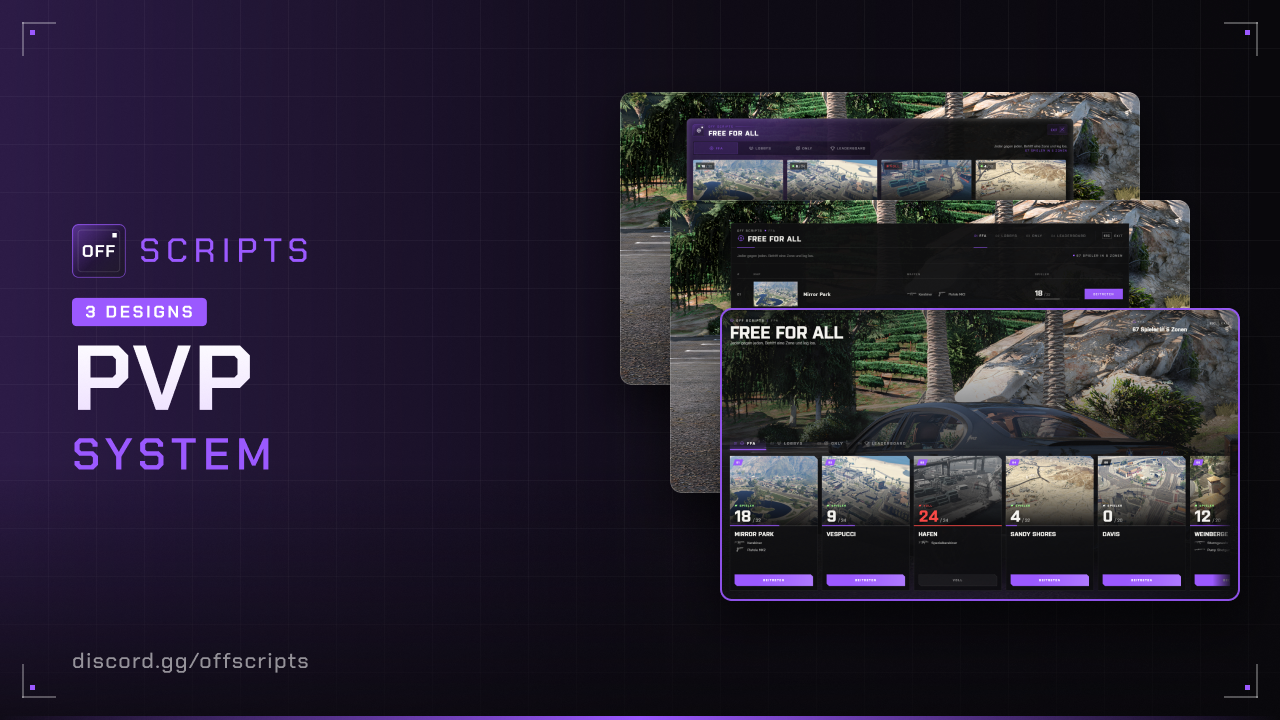
PVP
PvP system with FFA zones, Only zones and lobby matches in teams. Every zone and every match runs in its own dimension. On top of that there's a leaderboard and a match display. The script creates the table itself.
- ESX Legacy (
es_extended, tested with 1.14) - oxmysql
- OneSync
- In ESX,
Config.EnablePVP = truehas to be set (default) - For the garage menu on vehicle maps: esxmenudefault (or your own menu via
ClientVehicleMenu)
Features
- FFA zones: Everyone against everyone. Per zone fixed weapons or the player's own weapons. Respawn with armor and short spawn protection.
- Only zones: Everyone has the same weapons, optionally with a vehicle (e.g. BF 400) on every spawn.
- Lobbies: Team A vs. Team B in best-of mode with a decider round. Map, mode (on foot or vehicle), rounds, up to 3 weapons and an optional password can be chosen. The owner can kick, shuffle and disband.
- Spectating: Whoever is eliminated in a round watches the living teammates and switches with ← →.
- Match display at the top center and Leaderboard with the filters FFA, Only and Lobby (including wins and losses).
- Weapon protection: Fixed weapons only exist in PvP. The real weapons and their ammo stay protected.
- Discord logs, exports and your own functions to connect other scripts.
Installation
- Put the
off_pvpfolder into yourresourcesfolder. - Add to your
server.cfg, after oxmysql and ESX:
ensure oxmysql
ensure es_extended
ensure off_pvp- Adjust PvP points, zones and maps in
config/to your server.
The off_pvp_stats table is created automatically on the first start.
The zones in config/settings/config.ffa.lua and config/settings/config.only.lua and the maps in config/settings/config.lobby.lua are only examples. Check all positions in game and enter your own.
Configuration
The settings are in config/settings/: config.lua for everything general, config.ffa.lua, config.only.lua and config.lobby.lua for the three modes.
config/settings/config.lua
| Option | Default | Description |
|---|---|---|
serverInfo.name | 'OFF SCRIPTS' | Server name, shown in the UI instead of "OFF SCRIPTS" |
serverInfo.locale | 'de' | Language: de, en, pl, fr, es or it |
serverInfo.color | { 155, 89, 255 } | UI color (RGB) |
serverInfo.design | 3 | UI design: 1 = Classic, 2 = Receipt, 3 = Storefront |
blur | true | Blurred background while the menu is open |
quitCommand | 'quitffa' | Command to leave FFA, Only, lobbies and running matches |
defaultPed | 's_m_y_valet_01' | NPC for points without a valid ped |
points | 1 example | PvP points where E opens the menu (see below) |
marker | see file | Look of the marker points: type, size, alpha, drawDistance |
respawn.seconds | 3 | Wait time until respawn in FFA and Only |
respawn.protection | 3 | Seconds of invulnerability after spawning |
respawn.armour | 100 | Armor after spawning |
killHeal | true | Full health and full armor after every kill (FFA, Only and Lobby) |
leaderboardSize | 50 | How many players the leaderboard shows per mode (3–500) |
PvP points (points):
| Field | Description |
|---|---|
id | Unique name of the point |
label | Name in the help text and on the blip |
position | vec4(x, y, z, heading) |
interaction | 'ped' = NPC, 'marker' = marker on the ground |
ped | NPC model, without a valid model defaultPed is used |
scenario | NPC animation (optional) |
blip | { sprite, color, scale }, false = no blip |
config/settings/config.ffa.lua and config/settings/config.only.lua
Config.ffa and Config.only contain the zones. Each zone has:
| Field | Description |
|---|---|
id | Unique name, also the image name: web/dist/assets/maps/<id>.png |
label | Name in the menu |
center | Center of the zone, vec3 |
radius | Radius in meters. Whoever leaves it is put at a random spawn |
maxPlayers | Players at the same time |
spawns | List of vec4. On respawn, the spawn farthest from other players is used |
weapons | { name, ammo }. FFA: optional, without a list players fight with their own weapons and use real ammo. Only: required |
vehicle | Only zones only, optional: { model, label }. Players spawn on this vehicle |
config/settings/config.lobby.lua
Config.lobby contains the settings for lobbies:
| Option | Default | Description |
|---|---|---|
maxPlayers | 10 | Players per lobby, at most half per team |
maxLobbies | 8 | Lobbies at the same time |
maxWeapons | 3 | Weapons you can pick when creating a lobby |
rounds | 1 / 15 / 5 | Rounds: min, max and default |
prepareSeconds | 3 | Preparation before each round (frozen, no weapons), 3 seconds longer in the first round |
roundEndSeconds | 1 | Break after a round |
resultSeconds | 1 | Result display, then everyone goes back |
roundMinutes | 5 | Time limit per round, 0 = no limit |
spectateDelay | 3 | Seconds after death until spectating |
startRange | 50.0 | How close all members have to be to a PvP point at the start |
overtimeRounds | 1 | Decider rounds on a tie, 0 = draw |
armour | 100 | Armor at the start of each round |
weapons | 10 weapons | Weapons to choose from when creating a lobby: { name, ammo } |
vehicles | 3 vehicles | Default vehicles for vehicle maps without their own list: { model, label } |
Config.maps contains the maps for lobbies:
| Field | Description |
|---|---|
id / label | Unique name (= image name, like the zones) and display name |
mode | 'foot' = on foot, 'vehicle' = vehicle map |
center / radius | Sphere shown in the match (vec3 and meters). It's only for display, there's no boundary |
vehicles | Optional, own vehicle list { model, label }. Without a list, Config.lobby.vehicles is used |
teams.a / teams.b | One spawn (vec4) per team. All players of the team start every round there |
garage / vehicleSpawn | Vehicle maps only, per team: garage marker (vec3) and spawn point (vec4) |
config/functions.lua
This is where you hook up your own scripts. Errors in it end up in the console, the script keeps running. kind is always 'ffa', 'only' or 'lobby'.
| Function | Side | Purpose |
|---|---|---|
ServerCanJoin(source, kind, id) | Server | return false, 'Text' blocks joining and lobby start, e.g. in jail |
ServerKill(killer, victim, kind, id) | Server | Counted kill, e.g. money as a reward |
ServerDeath(victim, killer, kind, id, teamkill) | Server | Every death, killer can be nil |
ServerMatchEnded(lobbyId, result) | Server | Match ended: { winner, score, map, teams }, winner = 'a', 'b' or nil |
ServerJoined(source, kind, id) | Server | Player enters a zone or a match |
ServerLeft(source, kind, id, reason) | Server | reason = 'quit', 'drop', 'end', 'kick' or 'stop' |
Notify(message, type) / HelpNotify(text) | Client | Notify and help text · Server: Notify(source, message, type) |
ClientRevive(position) | Client | Revive, e.g. your own ambulance script |
ClientDeath(kind) / ClientRespawn(kind) | Client | Death and respawn in PvP, e.g. hide the death screen |
ClientGiveLoadout(loadout) | Client | Give weapons and give them back |
ClientSetFuel(vehicle, fuel) | Client | Fuel script |
ClientVehicleSpawned(vehicle, plate, kind) | Client | PvP vehicle spawned, e.g. give keys |
ClientVehicleMenu(vehicles, onSelect) | Client | Garage menu on vehicle maps (default: ESX default menu) |
ClientStateChanged(state) | Client | { kind, id, team } on entering, nil on leaving, e.g. lock the phone or your own HUD |
config/settings/config.server.lua and languages
Discord webhooks for lobby (lobby created, match started, match ended, lobby disbanded) and zones (zone entered and left). '' turns a log off. All texts are in config/locales/ (one file per language).
In game
- Menu: E at a PvP point. This only works while you're alive, on foot, in the normal dimension and not in a gang war.
- FFA and Only: Join teleports you into the zone. After death you continue at a spawn after
respawn.seconds. At the top you see kills, deaths and the players in the zone. - Leaving:
/quitffa(or yourquitCommand) takes you back to the place where you joined. Health and armor are like before, your own weapons come back. The command also leaves a waiting lobby. - Create lobby: Pick map, mode, rounds, weapons and optionally a password. New players go into the smaller team. Switching works as long as the other team isn't full. After 5 wrong passwords the lobby is locked for you for 60 seconds.
- Owner: starts, shuffles, kicks and disbands. If the owner leaves, the next member takes over.
- Start: Whoever is dead, in another dimension, in a gang war or farther than
startRangefrom a PvP point gets removed from the lobby. Each team needs at least one player. - Match:
- Each round starts with the preparation (frozen, no weapons), after that you get weapons and armor.
- A round is won by taking out the whole enemy team. There's no respawn within a round. If the last two die at the same time, nobody gets a point.
- If the time limit runs out, the team with more living players wins, on a tie nobody gets a point.
- The match is won by whoever first takes more than half of the rounds. Once all rounds are played, the higher score wins. On a tie there are decider rounds (
overtimeRounds), then a draw. - Friendly fire is on. A teamkill counts as a death, not as a kill.
- Whoever leaves a running match gets a loss. If a team is empty after that, the other one wins immediately.
- After that everyone returns to their starting point, the lobby stays open and waits again.
- Spectating: After
spectateDelayseconds you watch a living teammate. Their name and the arrows are shown at the bottom center. ← and → switch. - Garage (vehicle maps): During the round, E at your team's garage marker opens the vehicle list. Each player has one vehicle, a new one replaces the old one.
- Leaderboard: The best players per mode (number via
leaderboardSize), sorted by kills. New values show up within a minute at the latest, right away after a match.
For developers
-- Server
local inPvp = exports.off_pvp:IsInPvp(source)        -- FFA, Only or running match
local ffa = exports.off_pvp:IsFFA(source)
local only = exports.off_pvp:IsOnly(source)
local lobby = exports.off_pvp:IsLobby(source)        -- in a running match
local inLobby = exports.off_pvp:IsInLobby(source)    -- member of a lobby, waiting or in a match
local info = exports.off_pvp:GetPvp(source)          -- { kind, id, team, alive, kills, deaths } or nil
local removed = exports.off_pvp:RemoveFromPvp(source) -- takes the player out of a zone, match or waiting lobby, true/false
local stats = exports.off_pvp:GetStats(source)       -- { ffa = { kills, deaths }, only = { ... }, lobby = { kills, deaths, wins, losses } } or nil

-- Client
local inPvp = exports.off_pvp:IsInPvp()
local ffa = exports.off_pvp:IsFFA()
local only = exports.off_pvp:IsOnly()
local lobby = exports.off_pvp:IsLobby()
local spectating = exports.off_pvp:IsSpectating()
local info = exports.off_pvp:GetPvp() -- { kind, id, team, phase } or nil- Statebag
offPvp:'ffa','only'or'lobby'while the player is in a zone or a match. - offinventory:
canOpen()inoff_inventory/config/functions.luablocks the inventory and trunk in PvP as soon as offpvp is running.
Common issues
On start, the script reports errors and hints in the server console. Faulty zones and maps are listed there and ignored.
| Problem | Solution |
|---|---|
| “That is not possible right now.” when opening | You're dead, in another dimension or in a gang war. |
| Zone or map missing in the menu | Check the console, the entry has an error (e.g. no spawns). |
| No image for the zone or map | web/dist/assets/maps/<id>.png is missing. |
| Garage doesn't open a menu | Start esxmenudefault or adjust ClientVehicleMenu. |
| Players don't damage each other | Set Config.EnablePVP = true in ESX. |
| Ambulance script shows the death screen in PvP | Hide it in ClientDeath and show it again in ClientRespawn. |
| In the wrong place after a crash | On your next login you're taken back to your starting point automatically. |
| Resource restart during a match | Everyone gets sent back, the match isn't counted. Better not restart during matches. |
Not bought yet?
View PVP in the shop