Pompa
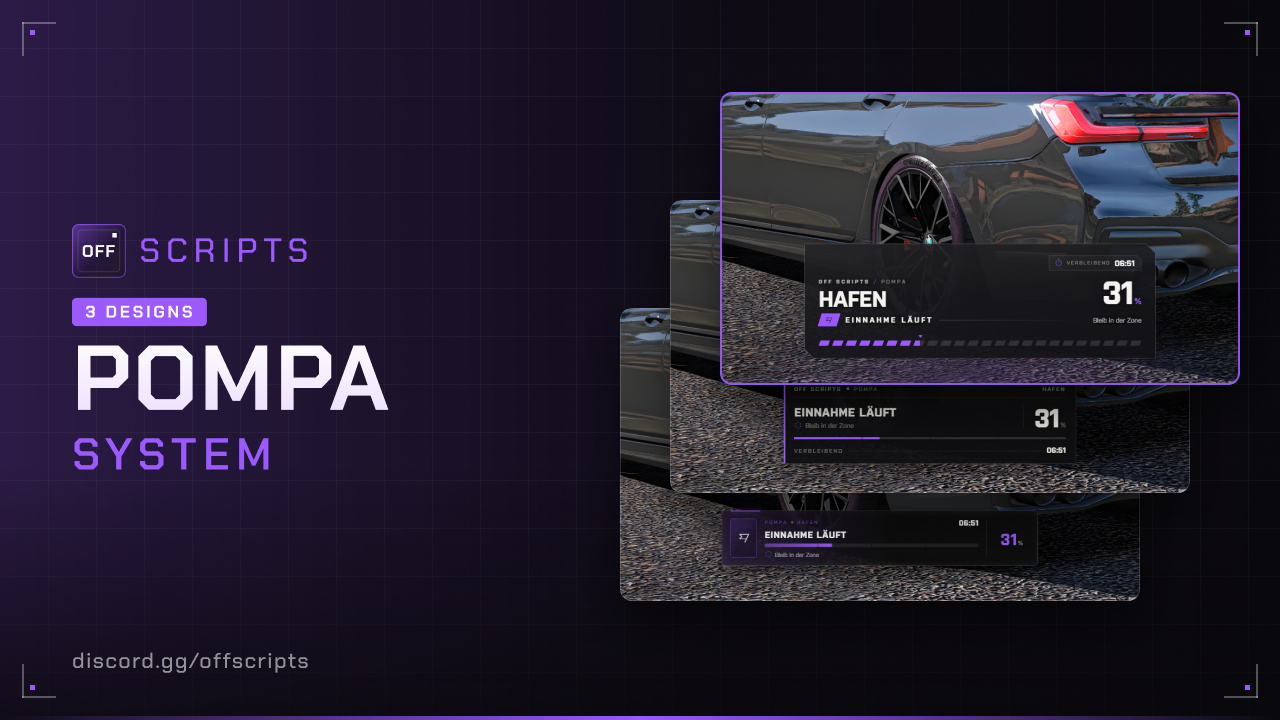
Pompas spread across the map: attack them at fixed times, hold them for a while and grab the reward. With colored markers per state, zone, announcement for everyone and progress bar. Everything runs through the config, the script saves the cooldowns itself.
- ESX Legacy (
es_extended, tested with 1.14) - oxmysql
- OneSync (
set onesync onin yourserver.cfg)
Features
- Four states with their own color for marker (RGB) and blip (GTA blip color):
- Attackable (green): E starts the pompa.
- Under attack (red): a pompa is running here right now.
- Cooldown (orange): after capture or abort, the remaining time is shown in the hint.
- Outside hours (white): starting only works at the set times.
- Zone: Every pompa has its own radius. The attacker has to stay inside. If he leaves the zone, he has a few seconds to come back (
returnTime, default 5), otherwise the pompa is aborted. Players nearby see the zone as a sphere, on the map there is a radius blip. - Capture time and cooldown: In minutes, the same for all pompas. At the bottom of the screen a progress bar shows the remaining time and percent.
- Announcement for everyone on start, capture and abort as a banner in the script's design. With
banner = falseit goes through theAnnouncefunction inconfig/functions.luainstead, where you hook in your own announce script. - Reward the same for all pompas: money (cash, bank, black money), items and weapons, also as a random amount.
- Only one pompa at a time. If the attacker dies or goes offline, the pompa is aborted.
- Blips on or off, main blip in the center of each pompa in the color of its state.
- Cooldowns are kept after a server restart.
- Discord logs for start, capture and abort.
Installation
- Put the
off_pompafolder intoresources. - Add to your
server.cfgafter oxmysql and ESX:
set onesync on

ensure oxmysql
ensure es_extended
ensure off_pompa- Add your pompas with their position in
config/settings/config.pompas.lua, the reward inconfig/settings/config.lua.
The off_pompa_cooldowns table is created automatically. Items and weapons from the reward must exist in ESX, the server console reports unknown ones on start.
Configuration
config/settings/config.lua
| Option | Default | Description |
|---|---|---|
serverInfo.name | 'OFF SCRIPTS' | Server name, shown in the UI instead of "OFF SCRIPTS" |
serverInfo.locale | 'de' | Language: de, en, pl, fr, es or it |
serverInfo.color | { 155, 89, 255 } | Color of the progress bar |
serverInfo.design | 3 | UI design: 1 = Classic, 2 = Receipt, 3 = Storefront |
times | 14:00 to 23:59 | Times when a pompa can be started (server time). Several possible, past midnight works too, empty = always |
duration | 20 | Minutes until capture, applies to all pompas |
cooldown | 15 | Minutes of cooldown after capture or abort, applies to all pompas |
returnTime | 5 | Seconds to come back after leaving the zone, otherwise abort |
banner | true | Announcement on start, capture and abort: true = banner from the script, false = your own announcement via Announce |
rewards | Black money, lockpicks | Reward for every captured pompa, see below |
ignoreWeight | false | true = give items even beyond the carry weight, otherwise the item is lost when the inventory is full |
colors | Green, red, orange, white | RGB color per state: attackable, attacking, cooldown, closed |
marker | see file | Marker type, size, opacity, view distance and distance for E |
key | 38 | Key to start as control ID (E) |
blips.enabled | true | Blips on or off |
blips.sprite / scale / shortRange | 437 / 0.8 / true | Look of the main blip |
blips.colors | 2, 1, 47, 0 | GTA blip color per state (blips can't do RGB) |
blips.radius / radiusAlpha | true / 90 | Radius blip around the zone while a pompa is running |
Reward, applies to every pompa:
rewards = {
  { type = 'account', name = 'black_money', amount = { 20000, 30000 } },  -- random between
  { type = 'item',    name = 'lockpick',    amount = 3 },
  { type = 'weapon',  name = 'WEAPON_PISTOL', ammo = 60 },
},
config/settings/config.pompas.lua
Every pompa is an entry with position and radius of the zone.
{
  id = 'hafen',                           -- fixed name, don't change it later
  label = 'Hafen',
  position = vec3(1003.6, -3108.6, 5.9),
  radius = 45.0,                          -- zone in meters
},
config/functions.lua
This is where you connect your own scripts. Errors in it end up in the console, the script keeps running.
| Function | Purpose |
|---|---|
Notify(message, type) / HelpNotify(text) | Notify and help text · Server: Notify(source, message, type) |
ClientCanStart() | false = don't start a pompa right now, e.g. cuffed or in a vehicle |
ClientPompaStarted(pompa) / ClientPompaEnded(pompa, result) | Your own pompa started or over, e.g. sound |
Announce(message, kind, pompa) | Server: your own announcement for everyone, only with banner = false. kind = 'start', 'captured' or 'aborted'. Default: ESX notify |
ServerCanStart(source, pompa) | return false, 'Text' = may not start, e.g. police, too few cops online, jobs |
ServerPompaStarted(source, pompa) | Pompa started |
ServerPompaCaptured(source, pompa, rewards) | Pompa captured, e.g. faction points |
ServerPompaAborted(source, pompa, reason) | Aborted, reason = 'zone', 'death', 'drop' or 'admin' |
Example: starting only with at least 2 police officers on duty and not for the police themselves.
function ServerCanStart(source, pompa)
  local xPlayer = ESX.GetPlayerFromId(source);

  if xPlayer.getJob().name == 'police' then
    return false, 'Als Polizist kannst du kein Pompa starten.';
  end

  if #ESX.GetExtendedPlayers('job', 'police') < 2 then
    return false, 'Es sind zu wenige Polizisten im Dienst.';
  end

  return true;
end
Example: your own announce script instead of notify, without an announcement on abort.
Example: your own announce script instead of the banner (banner = false), without an announcement on abort.
function Announce(message, kind, pompa)
  if kind == 'aborted' then
    return;
  end

  TriggerClientEvent('dein_announce:show', -1, 'Pompa', message);
end
config/settings/config.server.lua and languages
Discord webhook pompa for start, capture and abort, url = '' turns the log off. All texts are in config/locales/ (one file per language).
In game
- Marker: Every pompa has a marker in the color of its state. The marker shows what's possible right now: start, cooldown with remaining time or the times.
- Start: Press E at the green marker. Everyone gets the announcement, you see the progress bar at the bottom.
- Zone: A sphere appears around the pompa (for everyone nearby) and a radius blip on the map. If you walk out, the progress bar shows a countdown. If you're not back after
returnTimeseconds, the pompa is aborted. - Capture: When the time is up, you get the reward and the pompa goes into cooldown. After that it's attackable again.
- Abort: Left the zone, died or went offline. In that case the pompa also goes into cooldown.
- Only one pompa runs at a time. The time is the server's. A pompa started shortly before the end of the times runs until it's done.
For developers
-- Server
local active = exports.off_pompa:GetActive()          -- nil if none is running
local state = exports.off_pompa:GetState('hafen')      -- 'attackable', 'attacking', 'cooldown' or 'closed'
local attacking = exports.off_pompa:IsAttacking(source)
exports.off_pompa:Abort()                              -- abort the running pompa
exports.off_pompa:ResetCooldown('hafen')               -- end the cooldown right away

-- Client
local state = exports.off_pompa:GetState('hafen')
local attacking = exports.off_pompa:IsAttacking()
Common issues
On start the script reports errors and hints in the server console.
| Problem | Solution |
|---|---|
| All markers are white | Outside of times. Check the server time. |
| Marker floats or is stuck in the ground | Get the position again, standing directly on the ground. |
| Pompa aborts even though you're close | The zone is a sphere, the height counts too. Zone too small for the terrain, increase radius. |
| Item reward doesn't arrive | Inventory full, see ignoreWeight. The console reports unknown items on start. |
| “OneSync is off” | Add set onesync on to your server.cfg and restart. |
| Starting should only work for certain jobs | Adjust ServerCanStart in config/functions.lua, example above. |
Not bought yet?
View Pompa in the shop