Clothingstore
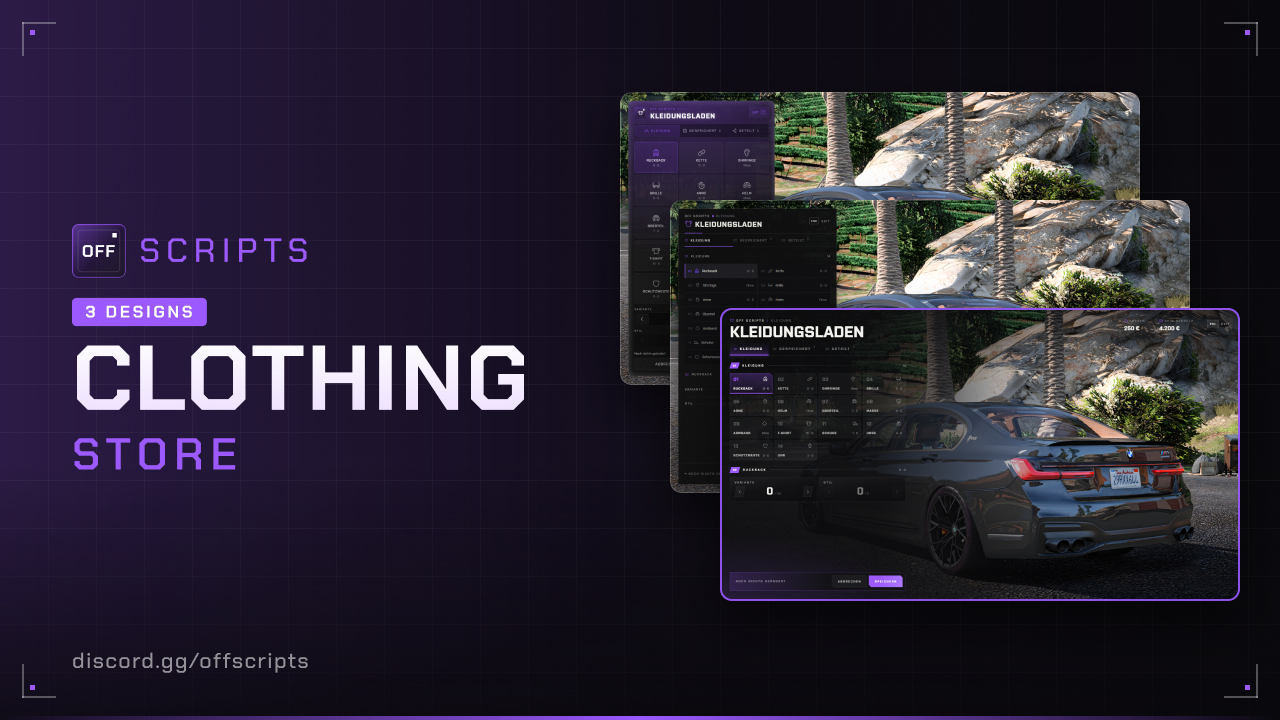
Clothing store with live preview: players change their clothes, save looks as outfits for cash and share them with others. With the clothing bag they can put on their outfits on the go, too. On top of that there is a barber shop and a tattoo studio with their own locations, blips and menus.
- ESX Legacy (
es_extended) - oxmysql
- skinchanger and esx_skin (included with ESX Legacy)
- OneSync (required)
- For the clothing bag: an inventory with ESX items (
itemstable), e.g. off_inventory
Features
- Live preview with a camera on the matching body part. Dragging rotates the character, the mouse wheel zooms.
- 14 categories with Variant and Style.
- Outfits per character: save them for a fixed price, wear, rename, share and delete them.
- Shared: wear other players' outfits for free (the 100 newest).
- Clothing bag (item
clothbag): put it down on the ground and wear your own outfits there. - Everyone sees the bag and can use it.
- Only the owner can pick it up. If the owner is offline, anyone can pick it up.
- Bags that were put down stay even after a restart.
/clearbagsclears all bags that were put down.- Barber shop with live preview and a camera on the head:
- all hairstyles and variants of the character model, all hair colors with highlights
- beard, eyebrows, chest hair, makeup, blush and lipstick with style, opacity and color (beard and chest hair only for male characters)
- You pay per changed category. Cancelling restores the old look.
- Tattoo studio with all GTA tattoos including DLCs, read directly from the game:
- sorted by head, torso, arms and legs, with search and the Mine filter
- preview on the character, get inked and remove for a fixed price
- saved per character and automatically re-applied after logging in, respawning and every skin change
- Barber shop and tattoo studio take cash first, the rest from the bank.
Installation
- Put the
off_clothingstorefolder into yourresourcesfolder. - Add to your
server.cfg, after oxmysql, ESX and skinchanger:
ensure oxmysql
ensure es_extended
ensure skinchanger
ensure esx_skin
ensure off_clothingstore- Remove
esx_clotheshopor other clothing stores at the same locations.
On the first start the script automatically creates:
- the tables
off_clothing_outfits,off_clothing_bagsandoff_clothing_tattoos - the item
clothbagin theitemstable, if it is missing
Configuration
config/settings/config.lua
| Option | Default | Description |
|---|---|---|
serverInfo.name | 'OFF SCRIPTS' | Server name, shown in the UI instead of "OFF SCRIPTS" |
serverInfo.locale | 'de' | Language: de, en, pl, fr, es, it or nl |
serverInfo.color | { 155, 89, 255 } | UI color (RGB) |
serverInfo.design | 3 | UI design: 1 = Classic, 2 = Receipt, 3 = Storefront |
blur | true | Blurred background while the bag menu is open. The store stays sharp because you see your own character there |
outfitPrice | 250 | Price per saved outfit (cash), 0 = free |
maxOutfits | 25 | Max. outfits per character |
marker | Disc, 3 m | Circle: type, size (area for opening), drawDistance, color, alpha |
blip | Icon 73 | Map icon (enabled, sprite, color, scale) |
locations | 14 stores | Center of the circle on the ground as vec3 |
barber | on, 7 locations | Barber shop, see below |
tattoo | on, 6 locations | Tattoo studio, see below |
config/settings/config.categories.lua – Categories
Only these categories appear in the store and only they are saved in outfits, in the order of the file.
{ icon = 'shoes', label = 'Schuhe', variant = 'shoes_1', color = 'shoes_2', camOffset = vec3(0, 0.9, -0.8) },| Field | Description |
|---|---|
icon | bag, chain, earrings, glasses, gloves, hat, jacket, mask, ring, shirt, shoes, shorts, vest, watch or a Phosphor icon with ph- |
label | Name in the store |
variant / color | skinchanger values for Variant and Style |
camOffset | Camera: x = left/right, y = distance forward, z = height |
config/settings/config.bag.lua – Clothing bag
| Option | Default | Description |
|---|---|---|
enabled | true | false = clothing bag completely off (no item, no bags) |
item | 'clothbag' | Item name, created in the items table on start |
weight | 1 | Weight of the item |
model | 'prop_cs_heist_bag_02' | Object of the bag on the ground |
max | 1 | How many bags a player may put down at the same time |
distance | 2.0 | Distance in meters for using and picking up |
clearCommand | 'clearbags' | Command that deletes all bags that were put down, '' = off |
clearGroups | { 'projektleitung' } | Groups allowed to use the command (server console always) |
With enabled = false bags that were put down stay in the database. They come back as soon as the bag is turned on again.
config/settings/config.lua – Barber shop and tattoo studio
Both have their own locations and blips, the circle (marker) is the same as for the store.
barber = {
  enabled = true,
  price = 150,
  blip = { enabled = true, sprite = 71, color = 0, scale = 0.8 },
  locations = { vec3(-814.3, -183.8, 36.6), ... },
},| Option | Default | Description |
|---|---|---|
enabled | true | false = barber shop or tattoo studio completely off |
price | 150 / 500 | Barber shop: price per changed category · Tattoo studio: price per tattoo, 0 = free |
removePrice | 250 | Tattoo studio only: price for removing a tattoo, 0 = free |
blip | Icon 71 / 75 | Map icon (enabled, sprite, color, scale) |
locations | 7 / 6 locations | Center of the circle on the ground as vec3 |
Payment takes cash first, the rest from the bank. Prices only exist on the server, the client cannot change them. Tattoos are saved in the off_clothing_tattoos table, at most 100 per character.
config/functions.lua
This is where you connect your own scripts.
| Function | Side | Purpose |
|---|---|---|
Notify(source, message, type) | Server | Message to a player (clothing bag, /clearbags) |
Notify(message, type) | Client | Message on the client (e.g. too far away, no freemode model in the tattoo studio) |
HelpNotify(text) | Client | Help text in the circle in front of the store, barber shop and tattoo studio (default: ESX.ShowHelpNotification) |
The server version sends the message directly via ESX. If you use your own notify script, adjust both Notify functions.
Languages
All texts are in config/locales/<language>.json, currency and number format under ui (currency, intl). For your own language, copy a file, translate it and set serverInfo.locale. Placeholders like %d and {price} must stay in. The category names are in config/settings/config.categories.lua (label). The names of the barber categories and body zones are under ui.barber.groups and ui.tattoo.zones, the tattoo names come from GTA in the game language.
In game
Store
Press E in the circle in front of the store, EXIT or ESC closes it.
- Clothing: change items and save them as an outfit.
- Saved: wear, rename, share and delete your own outfits.
- Shared: wear other players' outfits.
Clothing bag
- Put down: use the
clothbagitem in your inventory, the bag is put down on the ground in front of you. This doesn't work in a vehicle, while dead or in another dimension. - Above the bag you see [E] Use. The owner also sees [H] Pick up. If the owner is offline, everyone sees [H] Pick up.
- E opens a list of your saved outfits on the left. Wear puts the outfit on, the list stays open. ESC or EXIT closes it, and so does walking away.
- H puts the bag back into your inventory. You can change the key in the FiveM key bindings.
Barber shop
Press E in the circle in front of the barber shop. Hat and mask are taken off for the preview, the camera shows the head.
- Pick the category at the top: Hair, Beard, Eyebrows, Chest hair, Makeup, Blush or Lipstick.
- Change Style and Variant with the arrows or by clicking the number, Opacity with the slider, Color and Highlights in the color palette.
- Dragging rotates the character, the mouse wheel zooms.
- Pay shows the costs (price × changed categories) and saves the look. Cancel, EXIT or ESC resets everything that isn't paid yet.
Tattoo studio
Press E in the circle in front of the studio. The character is undressed for the preview, the clothes come back when you leave.
- Pick the zone at the top, the camera moves there. The number shows inked / all tattoos of the zone.
- Clicking a tattoo previews it on the character, another click hides it. Search tattoo filters by name, Mine only shows inked ones.
- Ink buys the tattoo, Remove takes off an inked tattoo for the removal price.
- Done, EXIT or ESC closes the studio.
Commands
| Command | Who | What happens |
|---|---|---|
/clearbags | Groups from clearGroups, server console | Deletes all bags that were put down. Owners who are online get their item back. Bags of offline players are only deleted. |
Console
On start the script checks the setup and reports errors and hints in the server console. If everything is fine, it says “started successfully” there. If this message is missing, read the errors above it, fix them and restart. If the clothbag item is newly created, the console reports that as well. If the barber shop or tattoo studio is on but has no locations, a warning appears.
Common issues
| Problem | Solution |
|---|---|
| Nothing happens on E | Stand in the middle of the circle. skinchanger and esx_skin must start before. |
| Circle floats or is in the ground | Adjust the height (z) in locations. |
| Look gone after reconnect | Only saving or wearing keeps the look, discarding resets everything. |
| Category shows only 0 variants | That item doesn't exist for your character model (GTA or clothing addons). |
| Bag is invisible | Check model in config/settings/config.bag.lua, the object must exist in GTA. |
Item clothbag is missing | Check the console. If the item isn't created, add it to the items table by hand. |
| [H] Pick up is missing | Only the owner can pick it up. Others only once the owner is offline. |
| H doesn't pick anything up | In the FiveM key bindings, check whether a different key is set for “Pick up clothing bag”. |
| “You already put down a bag.” | Pick up your own bag first or increase max. |
| Tattoos missing after a skin change | They are re-applied automatically shortly after. Don't use other scripts that set tattoos themselves. |
| “Tattoos are only available for regular characters” | Only mp_m_freemode_01 and mp_f_freemode_01 have tattoos. |
| Beard and chest hair missing at the barber | Hidden for female characters, like in GTA Online. |
| Barber look gone after reconnect | Only Pay saves the look, cancelling resets it. |
Not bought yet?
View Clothingstore in the shop